
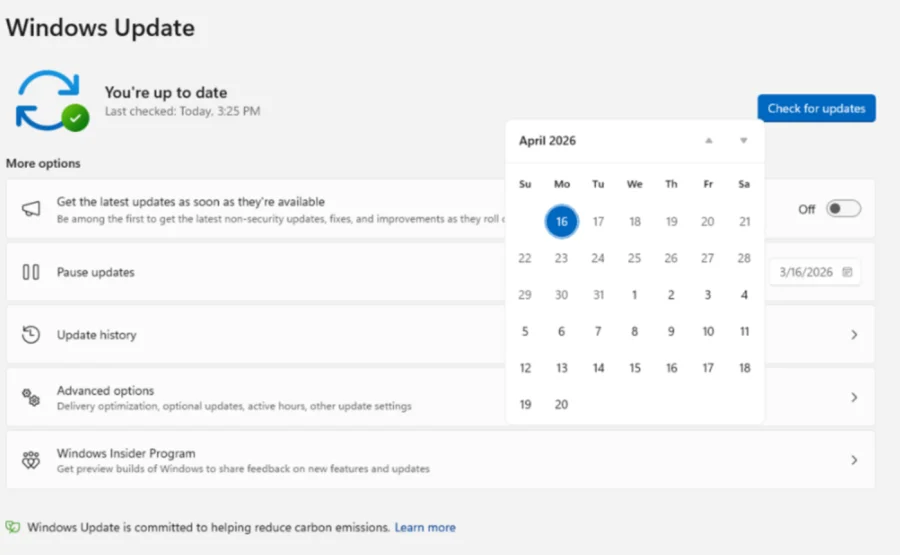

Microsoft ne Windows 11 users ke liye ek bada relief diya hai. Ab aap apne system ke forced updates ko hamesha ke liye pause kar sakte hain. Matlab ab aap meeting ya game ke beech mein update ka pop-up dekh kar nahi ghabraenge.
Windows 11 Update Pause: Kaise Kaam Karta Hai?
Microsoft Blog ke mutabiq, Windows Update mein ek naya option aaya hai. Ab aap Windows 11 updates ko 35 din ke liye pause kar sakte hain. Lekin sabse interesting baat yeh hai ki aap is 35-din ki limit ko baar-baar reset kar sakte hain. Matlab aap updates ko practically indefinitely rok sakte hain.
Microsoft ki Aria Hanson ne blog mein likha ki yeh changes users ko zyada control dene ke liye kiye gaye hain. Ab users decide kar sakte hain ki kab update install karna hai, na ki system forcefully update kare.
Kya Yeh Safe Hai? Security Ka Kya?
Microsoft ne clear kiya hai ki aapko eventually updates install karne chahiye. Zyada tar updates security upgrades ke liye aate hain, aur kabhi-kabhi emergency fixes bhi hoti hain. Lekin ab company users par bharosa kar rahi hai ki woh sahi time par updates install karenge.
"To give users more control, Windows Update introduced the option to extend update pauses as much as users want." — Microsoft Blog
Kyun Aaya Yeh Change?
Windows forced updates hamesha se users ki frustration ka reason rahe hain. Koi important meeting ho ya game ka crucial moment, tab update aana aur system restart hona — yeh problem ab khatam ho gayi. Microsoft ne users ki feedback suni aur yeh change kiya.
Ab aap apne update schedule khud set kar sakte hain. Lekin yaad rakhein — security updates ko ignore karna risky ho sakta hai. Microsoft ne sirf timing ka control diya hai, update ki importance kam nahi ki hai.
Hamaari Baat: Forced Updates Ka Khatma — Ek Positive Step
Hamari nazar mein yeh Microsoft ka ek bahut accha kadam hai. Forced updates ne users ko bahut pareshan kiya hai. Koi bhi nahi chahta ki uske kaam ke beech mein system restart ho jaye. Lekin ek baat dhyan rakhni hai — security updates ko ignore karna apne system ko risk mein dalna hai. Best approach yeh hai ki aap updates ko pause karein, lekin hafte mein ek baar check karein aur important security patches install karein. Control acchi cheez hai, lekin responsibility bhi utni hi zaroori hai.
Sources & References
- Microsoft Blog Post by Aria Hanson — Windows Blog